Monitoring Through A Color: Difference between revisions
From Loopy Pro Wiki
m tag |
No edit summary |
||
| (2 intermediate revisions by the same user not shown) | |||
| Line 1: | Line 1: | ||
If you have effects on a color channel, you can monitor an input through that color channel. To monitor through a color: | If you have effects on a color channel, you can monitor an input through that color channel. To monitor through a color: | ||
| Line 8: | Line 6: | ||
* Tap on the icon (which will probably say No Color) that brings up the color picker. | * Tap on the icon (which will probably say No Color) that brings up the color picker. | ||
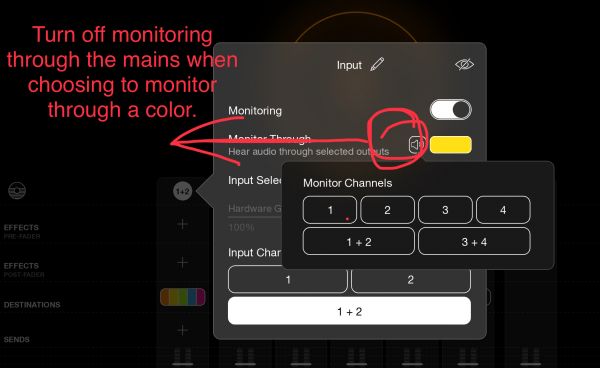
* Choose the Color whose Effects you want to monitor through. <br />[[File:monitor_through_img_5773.jpeg|600px]] | * Choose the Color whose Effects you want to monitor through. <br />[[File:monitor_through_img_5773.jpeg|600px]] | ||
== See Also == | |||
[[Multiple Paths For An Input]] | |||
[[Category:Advanced Features]] | [[Category:Advanced Features]] | ||
Latest revision as of 06:46, 1 February 2026
If you have effects on a color channel, you can monitor an input through that color channel. To monitor through a color:
- Show Loopy Pro's mixer.
- Tap on the icon at the top of the channel that you want to monitor
- Tap on the speaker icon to turn off monitoring through the mains
- Tap on the icon (which will probably say No Color) that brings up the color picker.
- Choose the Color whose Effects you want to monitor through.