Templates: Difference between revisions
No edit summary |
→Looking for Templates?: refine |
||
| Line 26: | Line 26: | ||
If you are looking for Loopy Pro projects to use as templates: | If you are looking for Loopy Pro projects to use as templates: | ||
* | * The [https://patchstorage.com/platform/loopy-pro/ PatchStorage] repository has a sizable and growing collection of templates many of which are ready-to-use. It is a good source for templates to start using and also demonstrations of techniques and setting you may want to use in your own projects. | ||
* Check out Edward's [[Templates:Edward's Workbench|workbench page]]. | |||
* See the Sample Projects folder in Loopy Pro | * See this list of templates available here on the wiki: [[:Category:Templates]] | ||
* | * See the Sample Projects folder in Loopy Pro. More info [[Sample Projects 2.0|here]]. | ||
* Check out the templates found on the [https://discord.com/channels/922977925182132245/1007577748627271750 Loopy Pro Discord] | |||
Revision as of 05:03, 1 March 2026
Templates are projects that can be used as stationery. When a new project is created from a template, you get a new project with a new name. The new project is a copy of the template project.
Creating A Template
Any project can be turned into a template by tapping the star icon in the project save panel.

Removing Projects from the Template List
To remove a a project from the templates list, tap on the template star in the project panel or in the project browser's list view.
Creating New Projects From Templates
When you create a new project, any template you have created is available for use. The behavior is different depending on how many templates you have created.
- If there is only one template, your template is automatically used when you create a new project. If you want to use Loopy Pro's default project instead of your template, long-press New Project in the project panel. It will let you choose the built-in Default factory project template.
- If there is more than one template, you are presented with a list of available templates.
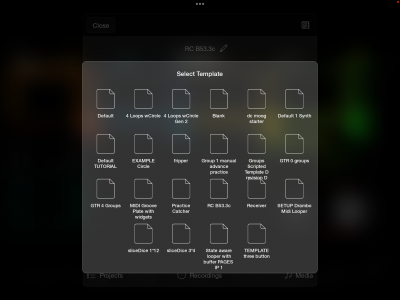

Using Loopy's default template instead of your own
If you have only marked one project as a template, all new projects automatically are built from that template. If you want to use Loopy Pro's default project instead of your template, long-press New Project in the project browser. It will let you choose the built-in Default factory project template.
Looking for Templates?
If you are looking for Loopy Pro projects to use as templates:
- The PatchStorage repository has a sizable and growing collection of templates many of which are ready-to-use. It is a good source for templates to start using and also demonstrations of techniques and setting you may want to use in your own projects.
- Check out Edward's workbench page.
- See this list of templates available here on the wiki: Category:Templates
- See the Sample Projects folder in Loopy Pro. More info here.
- Check out the templates found on the Loopy Pro Discord
